Dingo v1.3 released for download.

I suddenly remembered that I hadn’t made the improved version of Dingo for the Spectrum available for download yet, and as I’ve recently ceased communication with the artist (again) I thought it was a good time to put it online.

The changes in the 2015 version (version 1.3) are;

  • A much improved control method. This was the bug-bear for many people with the original release, but it’s now MUCH better.
  • Enemy pre-spawn warning – so you can see where the Dingos are about to appear and move out the way.
  • Bonus fruit stays on screen – It was easy to forget which was the bonus fruit during the game so the current bonus fruit is now displayed in the status area.
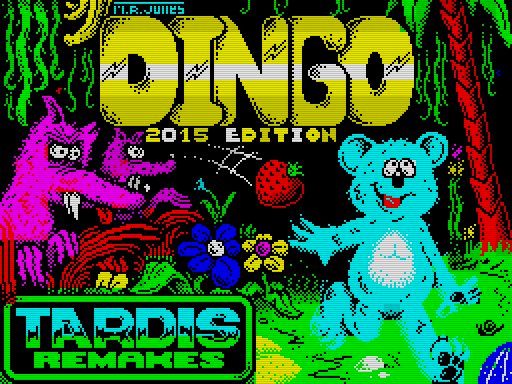
  • A new loading screen.
  • A couple of bugfixes.

Grab it – it’s free. Play it using an emulator or make your own cassettes and play as much as your heart desires. Just click the picture and click the download icon on the gamepage.


So, the updated version of Dingo was released.

At one point over the summer Mark R. Jones, who did the graphics for the Spectrum version of Dingo, asked me if I was interrested in re-releasing it as there seemed to be a demand for it.

I said “Okay, but we shouldn’t just release the same version as before – I want to tweak it first“. And then I did just that over the summer. The primary thing was a desire to improve the control method – which I did, but there are a few other changes too.

The changes in the 2015 version (version 1.3) are;

  • Much improved control method. This was the bug-bear for many people with the original release, but it’s now MUCH better.
  • Enemy pre-spawn warning – so you can see where the Dingos are about to appear and move out the way.
  • Bonus fruit stays on screen – It was easy to forget which was the bonus fruit during the game so the current bonus fruit is now displayed in the status area.
  • A new loading screen.
  • A couple of bugfixes.

Mark handled the duplication of the cassettes (in 3 different versions) and made a total of 52 copies. There are 26 double jewel cases, 21 clam cases & 5 double jewel ‘line drawing’ inlays. All of them numbered and signed by Mark.

Mark also arranged with Rob Buckley to have him produce a small Dingo tribute statue, so thanks to him EVERYONE who buys one will then be entered into a raffle once all the copies have been sold. Your name is entered for each copy you buy (so if you buy 2 copies your name is in the raffle twice). The person who’s name gets selected will then win the ‘Dingo’ tribute pictured below – once all the copies have been sold.

The updated version will also be put online as a free download once all the physical copies have been sold.

At the time of writing most copies are allready gone and there are only 10 double cases left. Write to Mark to buy your copy if you’re interrested in one. There won’t be produced any more.

Here’s a few pictures Mark took while duplicating the cassettes. Also pictured at the bottom is Rob Buckley’s Tribute sculpture.

The Clam Case version.


The double jewel cases.


The double jewel ‘line drawing’ versions.


All of them.


Rob Buckley’s Dingo tribute.


Rob Buckley’s Dingo tribute.


Rob Buckley’s Dingo tribute.


New game: Speccies 2 for arcade hardware.

Finally, a new game is out. It’s been a while. Actually, it has practically been finished for almost 4 months, but that extra time is well-spent as there’s now a couple less bugs…but also music – which it didn’t have back then, so that’s good. 🙂

The Speccies 2 is a puzzlegame – and a remake of the ZX Spectrum version I made a couple of years ago, but this time re-coded to to run on JAMMA arcade hardware. Most people will probably just run this through the MAME emulator but it can also be burned onto EPROMS – or EEPROMS – and run on an actual JAMMA arcade cabinet.

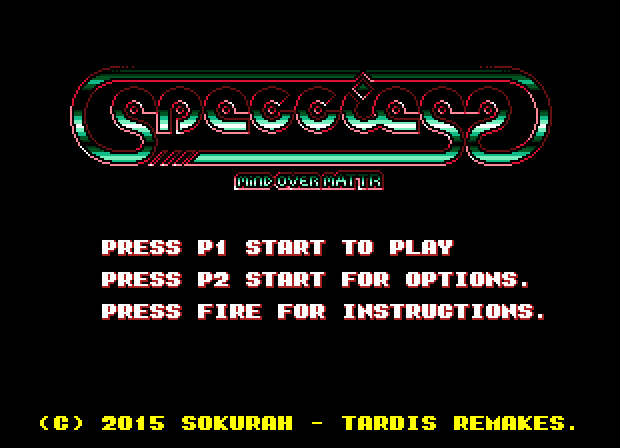
Here’s a screenshot. Click it to go to the games page where you can read more and also download the game.

The main menu in all its glory. 🙂

Omega Race 2009 updated to version 1.4 (Windows only).

Someone commented on my YouTube channel recently about the controls on Omega Race 2006 and as part of my answer I suggested the person to try out the 2009 version. He answered me this;

“Since I was interested in the most basic retro B&W vector-licious experience I haven’t tried the 2009 version yet. It really does a good job of looking like a vector screen”

I usually put in a fair amount of options in my games, so in retrospect I’m kinda surprised that I hadn’t added a monochrome mode to my second version of Omega Race. Well, a couple of days ago I decided to do just that. 🙂

I added a monochrome mode – still using glowing lines, but as I was finishing it I thought to myself “hey, this is not what I wanted to add” so I also added a “pure clean line monochrome version” to it too. Very retro. 😀

I also added the option to adjust the amount of glow (in the modes that uses it) which is also present in a couple of my later vector games – just to give people a chance to tweak the look a bit…not all monitors are the same. I also added the option to toggle the background music off. Personally I love the music, but it does enhance the retro-feel to play it without music. Now the option is there so you can chose your preferred style.

Read more and download the game here.

Here’s a couple of screenshots from the updated version.

Glowing monochrome mode (click to enlarge).


“Pure line mode” (click to enlarge).